Configuration may not be the most visible part of an integration project, but it is often the most time-consuming. Each project brings a different mix of devices, networks, and expectations, leaving system integrators with the tricky job of balancing precision with deadlines.
Every connection matters, every delay adds up, and every hour spent configuring is an hour not spent delivering results.
Yet, for many teams, configuration remains the slowest step in IoT integration. While connected systems and intelligent edge devices are now the norm, setup workflows can remain manual and fragmented.
MSA is addressing that challenge through a unified, visual configuration experience built around clarity, speed, and consistency. With a table-based interface that organizes connections, nodes, and points in a single view, system integrators can move from setup to validation – without unnecessary steps.
This interface approach reflects MSA’s broader focus on making complex integrations more intuitive and consistent across platforms. It’s one part of a larger effort to help system integrators deploy faster and with less complexity.
That is where the right approach and the right tools make the difference.
By combining efficient workflow solutions like FieldServer multiprotocol gateways and FieldServer Manager, system integrators can reduce deployment hours, simplify setup, and move from configuration to validation in less time.
Here are six practical ways to make that happen.
1. Begin with the End in Mind
Map before you configure to prevent rework and data conflicts.
Connecting devices without first mapping the network can lead to unnecessary rework so it’s best to start with a clear plan.
Best practice: Outline the data path from field to edge to cloud before configuring a single point. Then identify which devices use Modbus, BACnet, OPC UA, or MQTT, before deciding which systems need to communicate. Finally, lock in IP schemes to avoid conflicts.
A short planning session can save hours of troubleshooting and maybe even reveal unexpected opportunities to consolidate or streamline communication paths.
2. Standardize and Streamline Configurations
Turn proven setups into repeatable workflows that save time and prevent errors.
While every integration is unique, the most efficient teams rely on repeatable methods and proven setups.
Reusable configuration templates, or profiles, turn one-time setups into repeatable workflows. A solid profile captures key parameters, such as client/server settings, point naming, scaling rules, data manipulation, and event logging.
Once created, these profiles can become shortcuts for future projects, enabling integrators to import, adjust, and deploy configurations in minutes instead of hours.
This principle also shapes the design of MSA FieldServer gateways. For example, the EZ Gateways and Modbus IoT Gateway include graphical user interfaces (GUIs) that support profile creation, export, and version control, helping system integrators and OEMs apply proven configurations consistently across multiple sites.
Configuration on the Modbus IoT Gateway and other next-generation FieldServer gateways, is both visual and structured. A table-based layout that organizes devices, nodes, and points in one cohesive view, allowing integrators to add, edit, and review configurations without scripts or complex navigation.
Profiles, templates, and diagnostics all live in the same environment, creating a consistent workflow that shortens commissioning and improves accuracy. The result is greater clarity and consistency in every configuration step, and more time spent building reliable connections instead of troubleshooting details.
3. Validate Configuration in Real Time
Verify accuracy the moment data starts flowing.
Rather than waiting for field confirmation or SCADA feedback, integrators can confirm connectivity as soon as data starts flowing. The GUI displays live point values, connection states, and performance metrics, giving immediate confirmation that mappings and registers are correct.
This interface uses a clear table-and-template structure that streamlines navigation, simplifies adjustments, and maintains consistency across FieldServer products. Integrators can verify performance in real time, reduce manual corrections, and complete commissioning with fewer interruptions.
4. Build Diagnostics into the Workflow
Integrate monitoring and troubleshooting into everyday operation.
Troubleshooting after a system goes live can delay operations and increase costs. Integrators who build diagnostics into their workflow can identify and resolve issues before they interrupt performance.
Detailed system logs and event histories give teams a clear picture of device activity and communication status. Diagnostic captures collect this information into a single file, providing a record that simplifies root-cause analysis. With this visibility, integrators can trace data flow, confirm message integrity, and spot irregularities early, long before they become service calls.
MSA FieldServer gateways include integrated diagnostic tools within the same interface used for configuration. From one screen, technicians can initiate a capture, review results, and export data for review or escalation when needed. This seamless access to system insight shortens resolution time, reduces site visits, and keeps integrations performing as intended.
When visibility, action, and documentation all live in the same environment, maintenance becomes a continuation of configuration, improving uptime and reducing unplanned service calls.
5. Manage the Fleet, Not Just the Device
See every connected device from one secure dashboard.
As systems grow, configuration sprawl can become a challenge. FieldServer Manager addresses that by giving system integrators a single view of all connected FieldServer and EZ Gateway devices.
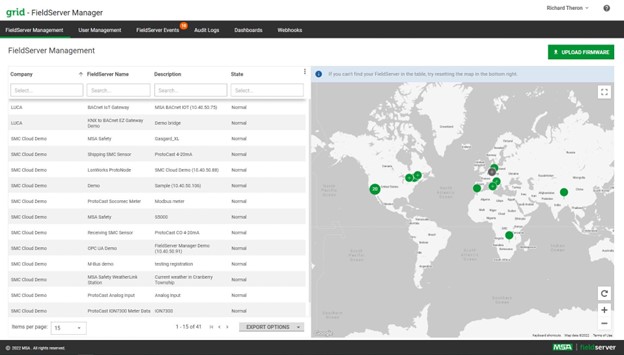
From one secure dashboard, users can monitor device health, view logs by time range, and locate installations on a map.
This centralized management reduces repetitive setup, maintains consistency, and allows teams to update entire fleets at once instead of configuring devices individually.
6. Design for Flexibility, Not Just Function
Choose hardware that adapts to your environment.
Not every site is wired or accessible the same way. That is why flexibility is built into every FieldServer gateway.
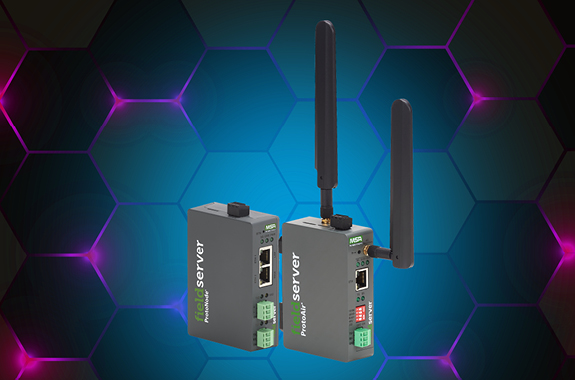
The new FieldServer Modbus IoT Gateway is available in four hardware configurations, each to fit different deployment needs:
- Single Ethernet + Dual RS-485 Ports for straightforward wired setups
- Dual Ethernet Ports for segmented traffic across subnets
- Wi-Fi Enabled for locations where cabling is not practical
- Cellular Connectivity (AT&T, Verizon, and generic networks) for remote access
Across all models, galvanically isolated RS-485 ports provide stable, noise-resistant serial communication, ensuring reliability in demanding environments.
Conclusion: From Configuration to Acceleration
Reducing configuration time is not about cutting corners. It is about removing unnecessary steps.
When system integrators plan networks, reuse proven profiles, validate configurations in real time, and manage fleets centrally, they move from reactive troubleshooting to consistent performance.
That approach defines MSA’s FieldServer portfolio, including EZ Gateways, the Modbus IoT Gateway, and FieldServer Manager. Each is designed to help integrators deploy faster, maintain with confidence, and keep systems operating at peak performance.
Because when configuration is efficient, integration moves forward.
Ready to simplify your next integration? Contact a FieldServer expert to get started.
Ready to modernize your Modbus devices?
Learn more about the new FieldServer Modbus IoT Gateway, or contact us for support on your next project.
LEARN MORERecommended for You