Skilled technicians are hard to find and projects aren’t slowing down. Most integration teams reach a point where the workload grows faster than the headcount. Whether the work is in oil and gas, manufacturing, building automation, or food service, the challenge is often the same.
More sites to support. More systems to commission. More stakeholders expecting fast answers when something goes wrong.
It’s a question nearly every integration manager faces: How do we support more sites without burning out the team we already have?
Need Modbus troubleshooting? Call Mike. PLC not communicating? Call Mike. Boiler integration acting strange? Call Mike. Gateway issue? Network issue? Mapping issue? Call Mike.
At some point, one person becomes the entire support strategy. That’s not a team. That’s a single point of failure.
The integrators staying ahead right now aren’t necessarily hiring massive teams. They’re building smarter workflows that help smaller teams operate more efficiently, reduce unnecessary truck rolls, and give newer technicians better visibility into what’s happening before problems escalate.
That’s exactly where MSA FieldServer gateways are helping lean integration teams rethink how they support projects in the field—not by replacing expertise, but by making expertise easier to scale.
Keep reading to learn how lean integration teams are reducing truck rolls, closing the experience gap, and getting more out of the teams they already have.
Signs Your Integration Team Is Stuck in Reactive Mode
The good news is that the problem is usually the process, not the people. Here are the most common signs an integration team is operating reactively rather than efficiently.
- Senior technicians get pulled into nearly every support issue.
- Technicians are driving onsite before basic diagnostics happen.
- Startup schedules keep slipping because support tickets interrupt project work.
- Junior techs escalate issues quickly because they lack visibility into the system.
- One or two employees carry most of the troubleshooting knowledge.
- Service calls routinely uncover issues unrelated to the gateway itself.
For many teams, this doesn’t happen because the team lacks talent. It happens because the workflow itself isn’t scalable yet.
The Problem Usually Isn’t the Gateway
One of the most expensive tendencies in integration work is assuming a problem requires an on-site visit before anyone has properly diagnosed the issue.
A customer says the system is down. Someone grabs a laptop, gets in the truck, drives two hours, badges into the building and discovers the boiler controller was offline the entire time. Or the field device lost power. Or an IP address changed. Or a cable came loose. Or the issue was entirely upstream from the gateway.
A half-day disappears solving a problem that could have been narrowed down remotely in just 20 minutes.
Most communication problems can be isolated quickly if the team has visibility into the system before someone gets in a truck.
Before Dispatching a Technician, High-Performing Teams Ask:
- Is the gateway communicating?
- Are Tx and Rx messages active?
- Is the field device or controller responding?
- Did the network configuration change?
- Is the issue isolated to one device or affecting the whole system?
- Is the boiler, drive, or end device itself offline?
- Can the issue be diagnosed remotely first?
The faster a technician can answer these questions, the faster the team can decide whether the issue requires a site visit. Because sometimes it does—and sometimes it doesn’t.
Why Lean Teams Need Better Diagnostics
Experienced technicians troubleshoot almost instinctively. They’ve seen enough systems to recognize patterns quickly. They know where to look first and they can tell which alarms matter and which ones are just noise during startup or commissioning.
Newer technicians don’t yet have that advantage. Nor should they be expected to show up with 10 years of pattern recognition on day one. That’s why diagnostics matter so much for growing integration teams.
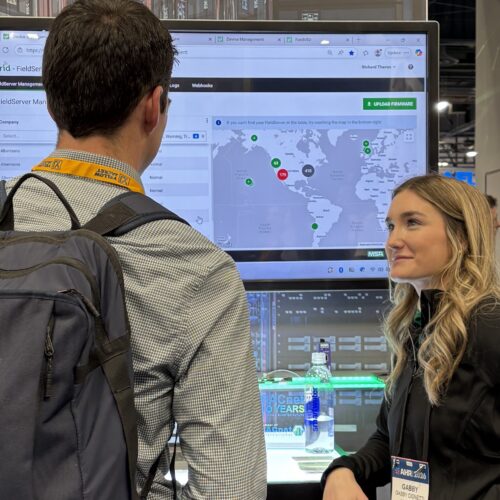
With MSA FieldServer gateways, technicians can review communication activity, connection status, and live data remotely instead of troubleshooting blind from a mechanical room or a plant floor.
Simple indicators like transmitted and received message counts immediately tell a technician whether a device is actively communicating. That single piece of information can change where troubleshooting goes next.
If messages are transmitting but nothing is being received back, that points in a very different direction than a complete communication failure. Instead of guessing, the technician can start isolating. This approach saves time, reduces frustration, and helps less-experienced technicians solve problems faster without escalating every issue to the same senior engineer.
A Typical Lean-Team Scenario
The situation: A contractor receives a call that a critical integration stopped communicating overnight. It could be a boiler controller, a variable frequency drive, or a building automation system.
The old way: Dispatch a technician. Drive two hours. Badge into the building. Start troubleshooting from scratch.
The smarter way: The team remotely reviews communication activity through the FieldServer gateway and quickly identifies that the gateway is transmitting messages normally but receiving no response from the controller. The issue turns out to be a field device problem, not the gateway itself.
The result: A two-hour drive becomes a 20-minute diagnosis.
The Real Cost of a Truck Roll
For a lot of operations teams, remote support used to feel optional. Now it’s essential because every unnecessary truck roll drains time and resources.
And it’s not just fuel costs or labor hours.
One technician spends the day driving to investigate an issue that could have been diagnosed remotely. Meanwhile, another project gets delayed, another stakeholder waits longer, another service ticket gets pushed back, another commissioning schedule slips, and another senior engineer gets pulled into support mode.
Over time, reactive service starts controlling the schedule instead of planned work. That’s when lean teams start feeling overwhelmed.
Remote diagnostics can help shift the balance. When technicians can remotely review configurations, verify communication activity, check device status, and identify likely failure points before dispatching someone on-site, better decisions get made about where field labor is needed.
Every avoided truck roll helps protect:
- Billable engineering time
- Startup schedules
- Customer response times
- Technician bandwidth
- Overall project profitability
What Smart Lean Teams Do Differently
The leanest teams aren’t just working harder. They’re working differently.
- They troubleshoot before dispatching: Remote diagnostics help teams narrow down issues before someone spends half a day driving to a site.
- They standardize workflows: Repeatable configurations and visual diagnostics reduce dependency on one senior engineer.
- They give junior technicians better visibility: Clear communication data helps newer team members troubleshoot more confidently across protocols and device types.
- They protect senior engineering time: Experienced specialists stay focused on commissioning, architecture, and high-value problem-solving instead of getting pulled into every support ticket.
Build Repeatable Processes, Not Bottlenecks
The organizations scaling successfully right now are becoming less dependent on what lives inside any one employee’s head.
Because when every non-standard issue requires escalating to the same senior engineer, the result isn’t a stronger team. It’s a bottleneck.
That’s one reason zero-code and low-complexity configuration tools are becoming more valuable. Not because experienced engineers can’t handle advanced setups, but because simpler workflows reduce risk, improve consistency, and help newer team members contribute faster.
When technicians can configure devices, review mappings, validate points, and troubleshoot communications visually—whether they’re working with BACnet, Modbus, or industrial protocols across mixed environments—work spreads more evenly across the team.
Instead of asking whether a senior specialist is available, teams start asking whether someone with moderate experience can handle the issue with the right tools and support.
That’s a much more sustainable way to scale.
Why Experienced Support Matters
One thing lean integration teams rely on but don’t always talk about is vendor support.
When a project gets complicated, a timeline tightens, or a communication issue becomes difficult to isolate, having experienced engineers available to help diagnose the problem matters.
The MSA FieldServer support team brings deep, real-world troubleshooting experience across protocols, devices, and environments, from building automation systems to industrial control applications.
When a technician can’t determine whether the issue is the field device, the network, the protocol configuration, the controller, or the gateway itself, a quick conversation with someone who has seen that exact issue before can save hours of trial and error on-site.
For lean teams supporting a wide range of systems, that outside expertise helps keep projects moving and gives technicians another resource when issues get complicated.
What Lean Teams Are Really After
Most teams aren’t trying to eliminate field service. They’re trying to use their teams more strategically.
They want senior technicians focused on high-value engineering work. Junior technicians growing into larger roles. Fewer reactive emergencies interrupting planned project work. Better visibility into systems before problems escalate. And service operations that can scale without burning people out.
The labor shortage isn’t going away tomorrow. Neither are customer expectations.
Teams still need to commission systems faster, support more sites and systems, and keep experienced technicians focused on the work that truly requires deep expertise.
Remote diagnostics, easier configuration tools, and better support workflows are already changing what’s possible for teams of every size. Not because they replace skilled technicians. Because they help lean teams operate like larger ones.
To learn how MSA FieldServer gateways can help your integration team troubleshoot smarter and support more projects remotely, contact us.
Download your free 25-Point Gateway Troubleshooting Checklist and help streamline gateway diagnostics from first inspection to escalation-ready resolution.
DOWNLOAD CHECKLISTRecommended for You